Guide
Bambu Studio on your Mac
Bambu Studio is Bambu Lab's free slicer, and it runs natively on macOS. Here's where to get it, how to connect your printer, and how to keep an eye on prints once the job is sent.
In short
Download Bambu Studio for Mac from Bambu Lab's official page: bambulab.com/en-us/download/studio. Open the download, drag Bambu Studio to Applications and open it.
To connect a printer, sign in with the same Bambu Lab account as the printer, or use LAN Only mode with the printer's access code. Prints are sent and followed on Studio's Device page.
Want progress in your menu bar without keeping Studio open? That's what Bambu Bar does; it doesn't slice, so you keep Studio for that.
Download Bambu Studio for Mac
Get Bambu Studio only from Bambu Lab: the official download page has the Mac version and lists its current system requirements. It's free. Bambu Lab also publishes the source code and every release on GitHub.
Avoid download sites that repackage the installer: the official page is always the current version.
Install and first launch
- Open the downloaded file and drag Bambu Studio into the Applications folder.
- Open it from Applications. macOS may ask you to confirm that you want to open an app downloaded from the internet.
- Choose your region, sign in with your Bambu Lab account (or skip it for LAN Only), and pick your printer models and filaments when Studio asks.
Connect your printer
Bambu Studio talks to a printer in one of two ways:
- Cloud mode. Sign in to Studio with the same Bambu Lab account the printer is bound to. The printer appears under My Device on the Device page, and you can print and monitor from anywhere.
- LAN Only mode. Turn on LAN Only on the printer's screen, then pick the printer under Other Device and type its access code. Everything stays on your network, but Bambu Handy and remote printing stop working. See LAN mode explained and where to find the access code.
The printer and the Mac must be on the same network for LAN Only, and macOS may ask whether Bambu Studio may find devices on your local network: click Allow. If the printer doesn't show up, see Bambu Studio not connecting.
Where you follow a print in Studio
The Device page shows the print's progress, temperatures, the AMS, the camera and controls. It's thorough, but it lives inside a large app window, so it's easy to lose behind your other work, and it only updates while Studio is open.
Keep progress visible without Studio
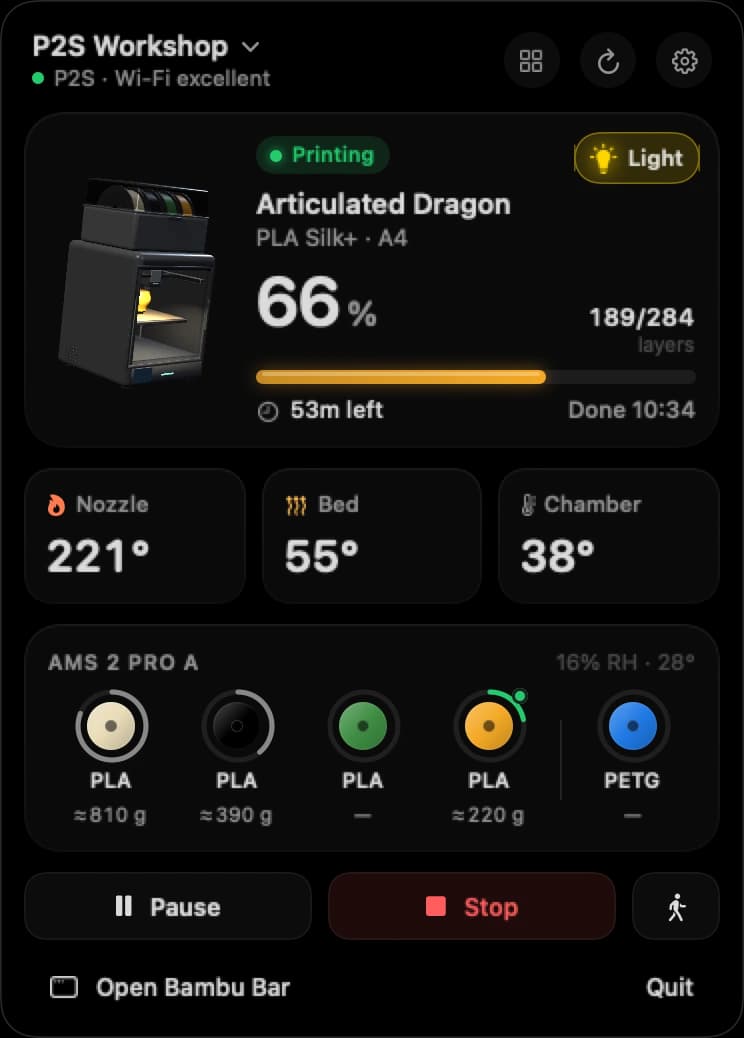
Bambu Bar is a small Mac app that shows your printer in the menu bar: 64% · 1h 02m at a glance, and a click opens the job, temperatures, the AMS spools with grams left, the live camera and the controls. Desktop widgets and notifications cover the rest.
It works alongside Studio rather than replacing it:
| Bambu Studio | Bambu Bar | |
|---|---|---|
| Slice models and send jobs | Yes | No |
| Print progress, temperatures, AMS | On the Device page | In the menu bar, a window and widgets |
| Live camera | On the Device page | In the menu bar, a window or a floating window |
| Finished and failed print alerts | Within Studio | macOS notifications |
| Connection | Cloud or LAN | Directly on your local network |
| Runs on | macOS and Windows | macOS 26 or later |
Setup is quick when Studio is already on your Mac: Bambu Bar finds your printers on the network and reads the access codes Studio saved, without changing Studio's settings. Getting started has the details.
Questions, answered
Is Bambu Studio free on Mac?
Yes. Bambu Studio is free and open source. Download it from Bambu Lab's official page.
Do I need to keep Bambu Studio open while printing?
No. Once a job is sent, the printer runs it on its own. Studio only shows progress while it's open; Bambu Bar shows it in the menu bar with Studio closed.
Does Bambu Bar replace Bambu Studio?
No. Bambu Bar doesn't slice or send files. It's a companion for following prints after Studio has sent them.
Can Bambu Bar use the printers I added in Bambu Studio?
Yes. It finds them on your network and reads their access codes from Studio's settings, read only. The Mac App Store version asks you to choose Studio's folder once.
Read next
- Bambu Studio not connectingPrinter missing from Bambu Studio, offline, or failing to connect on a Mac: the checks, in the order that finds the problem fastest.
- Bambu Handy on a MacWhat Apple's listing says about running Bambu Handy on a Mac, and the desktop alternatives for following prints.
- OrcaSlicer on a MacWhere to get OrcaSlicer for Mac, how it connects to Bambu Lab printers, and how Bambu Bar uses the printers it saved.
- The printer camera on your MacYour Bambu Lab printer's live view in the menu bar, the main window or a floating window, and how to set it up for your model.


Stop walking to the printer
Track Bambu Lab print progress, time left, temperatures, AMS filament and the live camera on your Mac. Get print alerts and desktop widgets without opening Bambu Studio.
Print progress, alerts and filamentmacOS 26+, Apple silicon & Intel Windows & Linux coming next