Comparison
Bambu Lab apps on a Mac: which one does what
Four apps, four different jobs. Here's what each one is for on a Mac, so you install the right ones and skip the rest.
In short
- Bambu Studio slices your models and sends prints. It's Bambu Lab's free desktop app, native on Mac.
- Bambu Handy is the phone app. On a Mac it runs only on Apple silicon, as an iPad app.
- Bambu Connect sends files from third-party slicers such as OrcaSlicer to the printer.
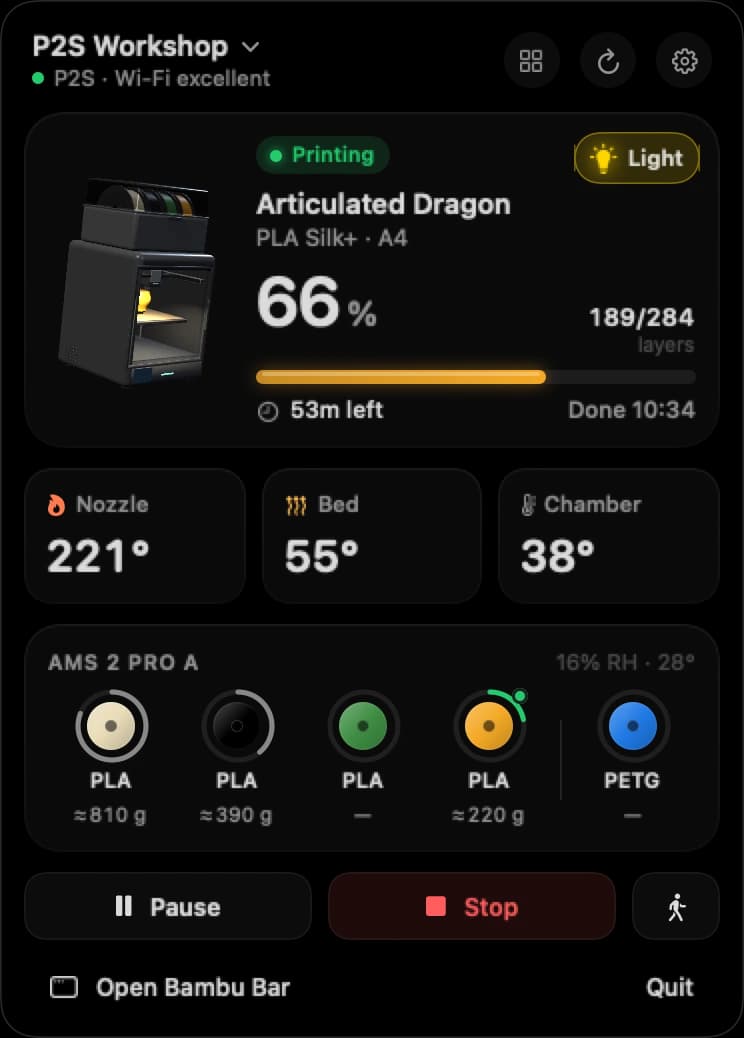
- Bambu Bar keeps progress, the live camera and your AMS filament in the Mac menu bar and on your desktop, on Apple silicon and Intel, in cloud or LAN Only mode. It runs on Windows too, in the tray.
Most people use Bambu Studio to print and Bambu Bar to watch, with Handy on the phone for when they're out.
The four apps at a glance
| Bambu Studio | Bambu Handy | Bambu Connect | Bambu Bar | |
|---|---|---|---|---|
| Made by | Bambu Lab | Bambu Lab | Bambu Lab | Clever Mechanisms, independent |
| What it's for | Slicing and sending prints | Your phone | Sending files from other slicers | Watching prints from the menu bar |
| On a Mac | Native app | Apple silicon only, as an iPad app | Native app | Native app, Apple silicon and Intel |
| LAN Only mode | Yes | No | For sending jobs | Yes |
| Live camera | On the Device page, while open | Yes | Not what it's for | Menu bar, main window and a floating window |
| Menu bar and desktop widgets | No | No | No | Yes |
| Away from home | Through Bambu Lab's cloud | Through Bambu Lab's cloud | No | No: your local network |
| Price | Free | Free | Free | Free, optional $9.99 supporter license |
Bambu Studio: slicing and sending
Bambu Studio is where prints begin. You open a model, pick the filament and settings, slice it and send it to the printer. Its Device page shows progress and the camera, but only while Studio is open and in front of you.
That's the gap most Mac users notice: once the job is sent, you don't want a full slicer window open for the next six hours just to see how far along it is. More in Bambu Studio on your Mac.
Bambu Handy: your phone, and maybe your Mac
Bambu Handy is made for the iPhone and iPad. Its App Store listing says it's designed for iPad and not verified for macOS, and lists Apple silicon Macs on macOS 13 or later as compatible. On an Intel Mac it doesn't run at all, and while the printer is in LAN Only mode it isn't available.
Handy shines away from home, through Bambu Lab's cloud. At your desk, an iPad app in a window is a stretch. More in Bambu Handy on a Mac.
Bambu Connect: the go-between for other slicers
Bambu Connect is Bambu Lab's app for sending print jobs from third-party software, such as OrcaSlicer, to a printer on current firmware. If you slice in Bambu Studio, you don't need it: Studio talks to the printer itself.
Bambu Connect is built for sending jobs, not for keeping an eye on them. More in Bambu Connect, explained. And you don't need it for Bambu Bar: Bambu Bar works without Bambu Connect installed.
Bambu Bar: your printer in the menu bar
Bambu Bar is the one you look at all day. Your print sits in the Mac menu bar (64% · 1h 02m at a glance), and a click opens the job, temperatures, the AMS spools with grams left and the live camera. Add desktop widgets, get a notification when a print finishes, fails or runs out of filament, and press ⌘K for a floating camera window that stays on top while you work.
- Straight from the printer: it connects on your local network, with no Bambu Lab sign-in, in cloud mode and LAN Only mode alike.
- Every Mac: macOS 26 or later, on Apple silicon and Intel.
- Every printer: all 15 Bambu Lab models, as many as you have, at once. Running a small farm? See Bambu Farm Manager on a Mac?
- Your PC too: Bambu Bar for Windows puts the same printers in the tray by the clock, with desktop widgets, the camera and Windows notifications, on Windows 10 and 11.
- Free to use, with an optional one-time $9.99 supporter license for automatic updates and the Hero Supporter badge. One key activates one Mac and one PC.
It doesn't slice, and it doesn't reach your printer from outside your home: that's what Bambu Studio and Bambu Handy are for.
Which should you install?
Pick by what you want to do:
- Slice and send prints: Bambu Studio, or OrcaSlicer if you prefer it (OrcaSlicer vs Bambu Studio).
- Check prints while you're out: Bambu Handy on your phone.
- Send from OrcaSlicer on current firmware: Bambu Connect, or Developer Mode.
- Keep an eye on prints while you work: Bambu Bar, in the menu bar and on your desktop (on a PC, in the Windows tray).
On an Intel Mac
Bambu Handy doesn't run there. Bambu Studio and Bambu Bar both do, natively.
In LAN Only mode
Bambu Handy stops working, because it goes through Bambu Lab's cloud. Bambu Studio keeps working on your network, and so does Bambu Bar, which never needed the cloud. See Bambu Lab LAN mode.
Can I use more than one?
Yes, and most people do. They each do a different job, so they get along:
- Bambu Studio + Bambu Bar: slice and send in Studio, then close it. Bambu Bar reads the printers and access codes Studio already saved, so setup takes a click.
- Studio + Bambu Bar at home + Handy away: keep the printer in cloud mode, and you have your desk and your phone covered.
For more on what works at home and what works away, see local and remote monitoring.
Questions, answered
Is there a Bambu Handy app for Mac?
Not a Mac version. Bambu Handy is an iPhone and iPad app; its App Store listing lists Apple silicon Macs on macOS 13 or later as compatible and says it isn't verified for macOS. It doesn't run on Intel Macs.
Which Bambu Lab app should I use on a Mac?
Bambu Studio to slice and send prints, Bambu Handy on your phone for when you're away, and Bambu Bar to keep progress, the camera and AMS filament in your menu bar while you work. Bambu Connect only if you send from a third-party slicer.
Can I monitor a Bambu Lab printer from the Mac menu bar?
Yes, with Bambu Bar. It shows progress, time left, temperatures, AMS filament in grams and the live camera in the menu bar, with desktop widgets and notifications, on macOS 26 or later. It connects to the printer on your local network, with no Bambu Lab sign-in. On a Windows PC, it does the same from the tray.
Do I need Bambu Connect for Bambu Bar?
No. Bambu Bar works without Bambu Connect installed.
Is Bambu Bar free?
Yes. Bambu Bar is free to use, on Mac and Windows. An optional one-time $9.99 supporter license adds automatic updates and the Hero Supporter badge, and one key activates one Mac and one PC.
Read next
- Bambu Studio on a MacWhere to download Bambu Studio for Mac, how to connect your printer, and how to follow prints without keeping it open.
- Bambu Handy on a MacWhat Apple's listing says about running Bambu Handy on a Mac, and the desktop alternatives for following prints.
- OrcaSlicer on a MacWhere to get OrcaSlicer for Mac, how it connects to Bambu Lab printers, and how Bambu Bar uses the printers it saved.
- LAN mode explainedCloud mode, LAN Only, LAN Only Liveview and Developer Mode: four different settings, and which ones you actually need.
- Desktop widgetsSmall, medium and large widgets for the Mac or Windows desktop with your print's progress, time left, temperatures and filament, one per printer if you like.
- Get Bambu Bar for Mac and Windows: Download and LicenseGet Bambu Bar for macOS 26+ or Windows 10 and 11: the requirements, the optional $9.99 supporter license for a Mac and a PC, installing it and finding a purchase.


Stop walking to the printer
Track Bambu Lab print progress, time left, temperatures, AMS filament and the live camera on your Mac. Get print alerts and desktop widgets without opening Bambu Studio.
Print progress, alerts and filamentmacOS 26+, Apple silicon & Intel Also on Windows · Linux coming next
Stop walking to the printer
Track Bambu Lab print progress, time left, temperatures, AMS filament and the live camera on your PC. Get Windows notifications and desktop widgets without opening Bambu Studio.
Print progress, alerts and filamentWindows 10 and 11, x64 & ARM64 Also on the Mac · Linux coming next