Guide
Bambu Farm Manager on a Mac? What works instead
Bambu Lab's Farm Manager is a Windows program. If your desk runs on a Mac, you have two good options, depending on whether you want to see your printers or run a farm.
In short
Bambu Farm Manager doesn't run on a Mac: Bambu Lab makes it for Windows.
On a Mac, pick by what you need:
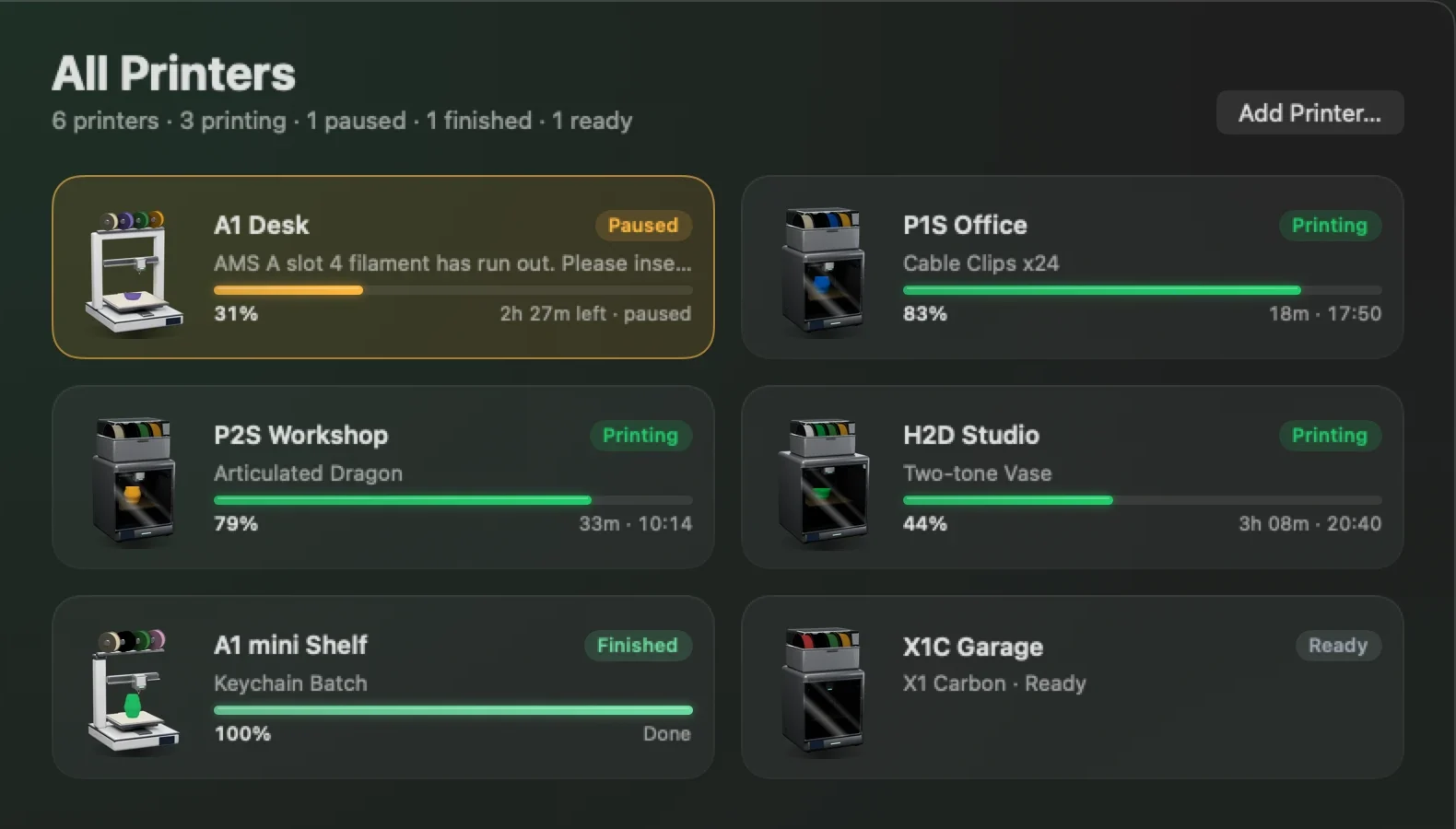
- See every printer at a glance, with alerts when one finishes, fails or runs out of filament: Bambu Bar shows them all in your menu bar, the ones that need you first.
- Queue and dispatch jobs across a fleet, with users and orders: use a print farm platform that works in a browser, or run Farm Manager on a Windows PC.
Most small farms need the first far more often than the second.
Monitoring or farm management?
"Print farm software" covers two different jobs, and most people with three to ten printers only need the first:
| Monitoring (Bambu Bar) | Farm management | |
|---|---|---|
| Live status of every printer | Yes, in the menu bar | Yes |
| Alerts when a print finishes, fails or pauses | Yes, as macOS notifications | Usually |
| Live camera | Yes, per printer | Varies |
| AMS filament with grams left | Yes | Varies |
| Queue jobs and send them to free printers | No | Yes |
| Users, orders, costs | No | Yes |
| Away from home | No: your local network | Often |
Option 1: Every printer in your menu bar, with Bambu Bar
Bambu Bar watches every Bambu Lab printer you add, all at once, from one Mac on the same network. It's built for exactly the question you ask a shelf of printers twenty times a day: which one needs me?
- All Printers, trouble first. Failed and paused printers come first, with the reason in plain words ("Paused: filament ran out"), then everything else by soonest finish, so the next plate to clear is near the top.
- Set up in one click. If Bambu Studio or OrcaSlicer on your Mac already knows your printers, Add All sets them all up at once, access codes included.
- Alerts that name the printer. A notification when a print finishes, fails, is canceled or pauses, each one saying which printer.
- One widget per printer. Put a desktop widget for each machine on your desktop, and each one follows its own printer.
- Mixed models welcome. All 15 Bambu Lab models, side by side, each showing what it reports, AMS filament and camera included.
It's free to use, on macOS 26 or later, Apple silicon and Intel, and Bambu Bar for Windows does the same from a PC's tray. More in multiple printers and print notifications. Get Bambu Bar
The honest limits: Bambu Bar is a monitor, not farm management software. It doesn't queue or dispatch jobs, assign printers to users or track costs, and it works on your local network, not from outside it. Jobs are still sent from Bambu Studio or OrcaSlicer, and pause, stop and speed need LAN Only with Developer Mode on each printer (why).
Option 2: A farm platform that works from a Mac
If you really do need jobs queued and sent to whichever printer is free, or orders and several people sharing one system, look at the print farm platforms that run in a browser or have a Mac client. They work from your Mac because the Mac is just the screen.
Bambu Bar fits alongside them: the platform runs the queue, and Bambu Bar keeps each printer's progress, camera and filament in your menu bar while you work.
Option 3: Bambu Farm Manager on a Windows PC
Bambu Farm Manager itself needs a Windows computer on the same network as your printers. If you have a spare Windows PC for the shelf, that's the official route. Your Mac can stay your desk, with Bambu Bar watching the same printers, and Bambu Bar for Windows can sit in that PC's tray too: one supporter license covers one Mac and one PC.
Which fits your shelf?
- A few printers, one person, you mainly want to know what's done and what's stuck: Bambu Bar.
- Jobs queued automatically, store orders turned into prints, or a team sharing printers: a farm platform, or Farm Manager on a Windows PC.
- Both: run the farm software for the queue, and Bambu Bar on your Mac for the glance.
Questions, answered
Does Bambu Farm Manager run on a Mac?
No. Bambu Lab makes Farm Manager for Windows. On a Mac, Bambu Bar monitors every printer from the menu bar; for queueing and dispatching jobs, use a print farm platform that works in a browser, or Farm Manager on a Windows PC, where Bambu Bar runs too, in the tray.
How do I monitor several Bambu Lab printers from one Mac?
Bambu Bar watches every Bambu Lab printer you add, at the same time. Its All Printers view lists failed and paused printers first, then the rest by soonest finish, and each notification and widget can follow its own printer. If Bambu Studio or OrcaSlicer already knows your printers, Add All sets them up in one click.
Do I need print farm software for a few Bambu printers?
Only if you need jobs queued and sent to free printers automatically, store orders turned into prints, or several people sharing one system. To see every printer's progress and get told when one finishes, fails or runs out of filament, a monitoring app like Bambu Bar is enough.
How many printers can Bambu Bar watch?
As many as you add, all at once, from one Mac or Windows PC on the same network as the printers.
Read next
- Several printers at onceEvery printer on one Mac or PC: the ones that need you first, then the rest by time left, with widgets and alerts for each.
- Print notificationsmacOS and Windows notifications for finished, failed, canceled and paused prints and new printer errors, and how to choose which you get.
- Desktop widgetsSmall, medium and large widgets for the Mac or Windows desktop with your print's progress, time left, temperatures and filament, one per printer if you like.
- Developer Mode and locked controlsWhy pause, stop and speed show a lock in Bambu Bar, what Developer Mode changes on the printer, and whether you need it.
- Get Bambu Bar for Mac and Windows: Download and LicenseGet Bambu Bar for macOS 26+ or Windows 10 and 11: the requirements, the optional $9.99 supporter license for a Mac and a PC, installing it and finding a purchase.


Stop walking to the printer
Track Bambu Lab print progress, time left, temperatures, AMS filament and the live camera on your Mac. Get print alerts and desktop widgets without opening Bambu Studio.
Print progress, alerts and filamentmacOS 26+, Apple silicon & Intel Also on Windows · Linux coming next
Stop walking to the printer
Track Bambu Lab print progress, time left, temperatures, AMS filament and the live camera on your PC. Get Windows notifications and desktop widgets without opening Bambu Studio.
Print progress, alerts and filamentWindows 10 and 11, x64 & ARM64 Also on the Mac · Linux coming next