Guide
Bambu Lab print alerts on your Mac or PC, without Handy or the cloud
LAN Only mode keeps your printer off the cloud, and takes Bambu Handy's notifications with it. Your computer can tell you instead, the moment a print finishes, fails or runs out of filament.
In short
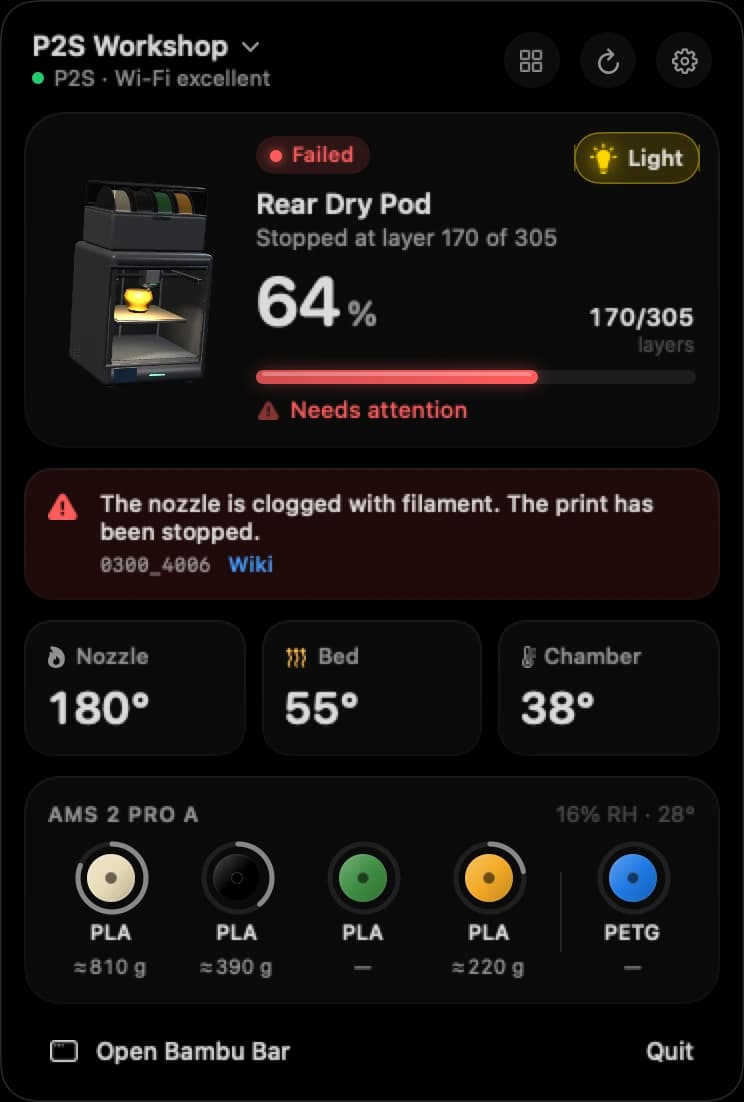
In LAN Only mode, Bambu Handy isn't available, so its notifications stop. Bambu Bar posts macOS or Windows notifications instead, straight from the printer on your network, when:
- a print finishes, with how long it took;
- a print fails or is canceled, with the reason;
- a print pauses, for example when the filament runs out;
- the printer reports a new error;
- optionally, a print starts.
It works the same in cloud mode and LAN Only mode, as long as your Mac or PC is awake, on the same network, with Bambu Bar running.
Why Handy's notifications stop in LAN Only mode
Bambu Handy reaches your printer through Bambu Lab's cloud, and so do its notifications. LAN Only cuts the printer off from that cloud, so Bambu Handy isn't available, and neither are its alerts. The same goes for Developer Mode, which needs LAN Only. See Bambu Lab LAN mode.
The printer still reports everything on your local network, though. An app on your Mac or PC can listen and tell you itself.
Your options at a glance
| Alerts in LAN Only mode | What it needs | |
|---|---|---|
| Bambu Bar | Yes, as macOS or Windows notifications | A Mac or PC on the same network |
| Bambu Studio | Only while it's open | Studio open on your computer |
| Bambu Handy | No: it needs the cloud | Cloud mode |
| Home automation | Yes, if you set it up | A home server and some setup (Home Assistant or a desktop app?) |
Set up notifications with Bambu Bar
- Install Bambu Bar and connect your printer: it finds the printer on your network and, if Bambu Studio or OrcaSlicer knows it, the access code too.
- Open the Notifications page in Bambu Bar's sidebar (⌘8 on a Mac, Ctrl+8 on Windows).
- Turn on the ones you want: Print finished, Print failed, canceled or an error, Print paused (filament runout, user) and, if you like, Print started.
- On a Mac, when macOS asks whether Bambu Bar may send notifications, click Allow. On Windows, send a test one from the Notifications page to see it arrive.
- Turn on Open at Login on a Mac, or Open at sign-in on Windows, so Bambu Bar is watching after every restart.
That's it. Bambu Bar is free to use, on macOS 26 or later (Apple silicon and Intel) and on Windows 10 and 11. Get Bambu Bar for Mac · Bambu Bar for Windows
What you'll be told
- Finished, with how long the print took, so you know it's ready to take off the plate.
- Failed or canceled, with the reason.
- Paused, when the filament runs out or someone pauses the print.
- New errors, in Bambu Lab's own wording, in your language where Bambu Lab publishes a translation.
- Started (optional): handy on a printer other people use too.
Each notification names the printer and the job, so with several printers you know which one needs you. On a Mac, a new notification of the same kind replaces the previous one instead of piling up, and a click opens Bambu Bar. More in print notifications.
When you won't get them
- The computer is asleep, or away from home. Bambu Bar watches the printer on your local network, so it has to be awake and nearby.
- Bambu Bar isn't running. Open at Login on a Mac, or Open at sign-in on Windows, takes care of that.
- The system is holding them. On a Mac, check System Settings → Notifications → Bambu Bar, and whether a Focus is on. On Windows, send a test notification from Bambu Bar's Notifications page.
Want phone alerts too?
Keep the printer in cloud mode and use Bambu Handy on your phone for when you're out. Bambu Bar keeps working at home either way: it reads the printer on your network in cloud mode and LAN Only mode alike. For the full picture, see local and remote monitoring.
Questions, answered
Can I get Bambu Lab print notifications without Bambu Handy?
Yes, on a Mac or a Windows PC. Bambu Bar posts macOS or Windows notifications when a print finishes, fails or is canceled, pauses (for example when the filament runs out), or the printer reports a new error, and optionally when a print starts. It works in LAN Only mode, when Bambu Handy isn't available.
Why did my Bambu Handy notifications stop?
Often because the printer was switched to LAN Only mode: Bambu Handy isn't available in LAN Only, and Developer Mode needs LAN Only. Turn LAN Only off on the printer's screen to get Handy back, or let an app on your Mac or PC, like Bambu Bar, send the alerts.
Do Bambu Bar notifications work in cloud mode and LAN Only mode?
Yes, the same in both. Bambu Bar reads the printer directly on your local network either way.
Do Bambu Bar notifications work when my computer is asleep?
No. Notifications come from the app on your Mac or PC, which watches the printer over your local network. If the computer is asleep, away from home, or Bambu Bar isn't running, it can't see the printer. Open at Login on a Mac, or Open at sign-in on Windows, keeps it running after a restart.
Read next
- Print notificationsmacOS and Windows notifications for finished, failed, canceled and paused prints and new printer errors, and how to choose which you get.
- LAN mode explainedCloud mode, LAN Only, LAN Only Liveview and Developer Mode: four different settings, and which ones you actually need.
- Local vs remote monitoringWhat local monitoring on your Mac or PC covers, what remote access needs, and why you shouldn't open your printer to the internet.
- Several printers at onceEvery printer on one Mac or PC: the ones that need you first, then the rest by time left, with widgets and alerts for each.
- Get Bambu Bar for Mac and Windows: Download and LicenseGet Bambu Bar for macOS 26+ or Windows 10 and 11: the requirements, the optional $9.99 supporter license for a Mac and a PC, installing it and finding a purchase.


Stop walking to the printer
Track Bambu Lab print progress, time left, temperatures, AMS filament and the live camera on your Mac. Get print alerts and desktop widgets without opening Bambu Studio.
Print progress, alerts and filamentmacOS 26+, Apple silicon & Intel Also on Windows · Linux coming next
Stop walking to the printer
Track Bambu Lab print progress, time left, temperatures, AMS filament and the live camera on your PC. Get Windows notifications and desktop widgets without opening Bambu Studio.
Print progress, alerts and filamentWindows 10 and 11, x64 & ARM64 Also on the Mac · Linux coming next