
Feature
AMS filament left, in grams
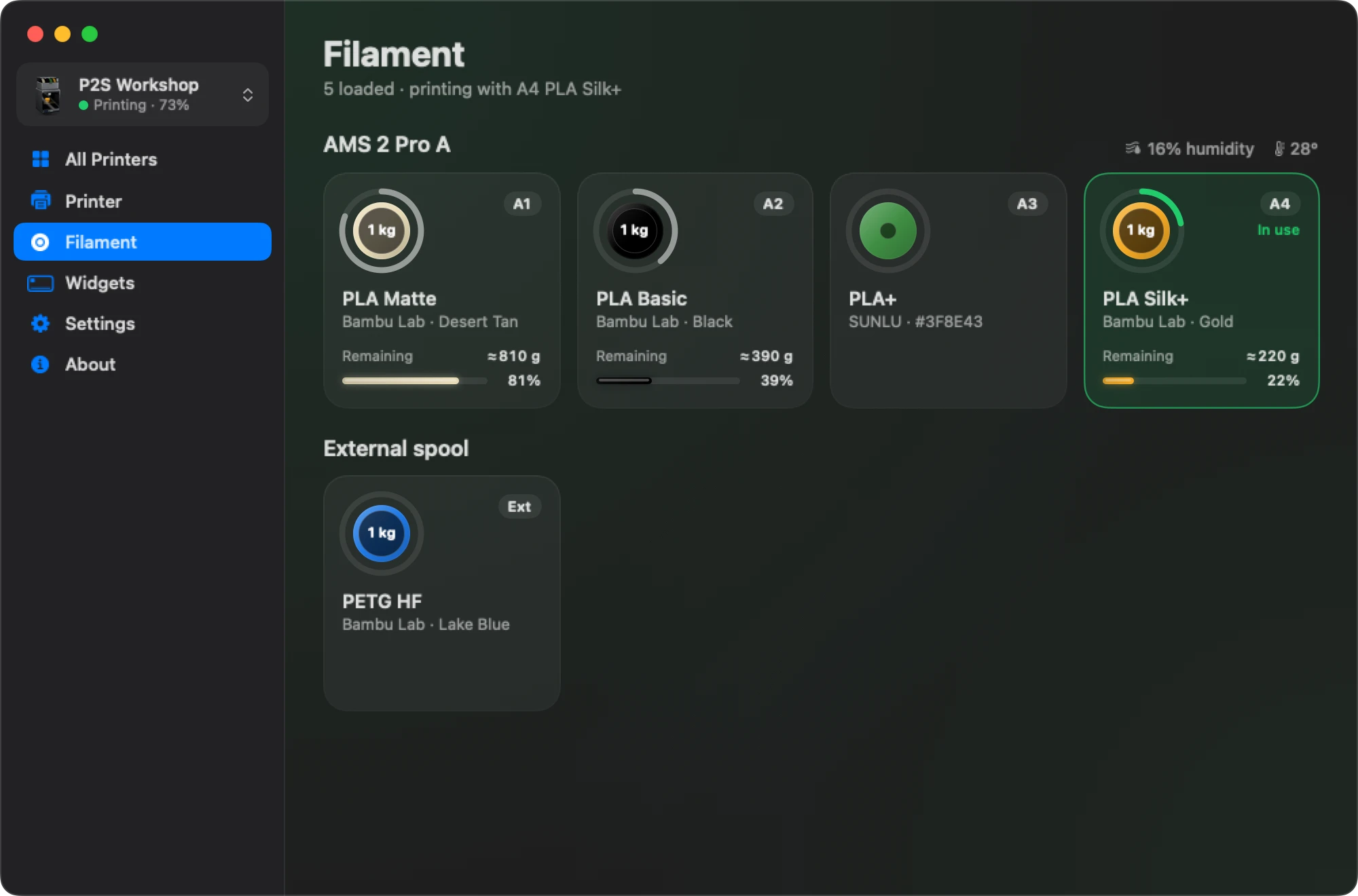
Bambu Bar shows every spool in your AMS with its colour name and how much is left: in grams on Bambu Lab spools, with the humidity of each unit.
In short
Bambu Bar shows the filament left on each AMS slot. For Bambu Lab spools with an RFID tag, it shows grams (≈ 810 g): the spool's net weight from its tag times the share the AMS reports as remaining.
For third-party spools, the printer doesn't know how much is left, so Bambu Bar shows the slot's material and preset name but no amount. It's an estimate, not a scale: the AMS doesn't weigh the spool.
Where the grams come from
Two numbers from the printer make the grams:
- The spool's net weight, from its Bambu Lab RFID tag: 1,000 g for a standard spool, for example.
- The share remaining, which the AMS reports as a percentage.
Bambu Bar multiplies them: 81% of a 1,000 g spool shows as ≈ 810 g. The ≈ is there for a reason: the AMS estimates what's left as it feeds filament, it doesn't weigh the spool, so treat the number as a good guide rather than a measurement. The tooltip shows both, like 81% · ≈ 810 g.
Bambu Lab spools and third-party spools
| Spool | Name shown | Amount shown |
|---|---|---|
| Bambu Lab, with RFID | The colour's real name: Jade White, Charcoal, Grass Green | Grams left |
| Third-party, or no tag | The maker and product of the preset you chose for the slot, like SUNLU PLA Matte | No amount ("Not measured") |
| Empty slot | Empty |
For a third-party spool, the printer has no way to know how much is on it, so Bambu Bar doesn't guess. Set the slot's filament preset on the printer or in Bambu Studio and its name appears instead of a generic "PLA".
What's on hand
The Filament page adds up the grams on every Bambu Lab spool, so you see how much you have in total, not just in the slot that's printing. The menu bar panel shows the spool that's feeding right now.
Enough for tonight's print? Compare the grams left with the print's filament use in Bambu Studio.
Humidity and temperature
On printers with an AMS that reports them, Bambu Bar shows each unit's humidity and temperature. The AMS Lite on the A1 and A1 mini doesn't have that sensor, so those printers show spools and grams without humidity.
Where you see it
- The menu bar panel: the spools in the AMS and the one feeding.
- The Filament page: every unit and spool, the external spool, and the total on hand.
- The large widget: every AMS spool with grams left, on your desktop. See desktop widgets.
It works with the AMS, AMS 2 Pro, AMS HT, AMS Lite and the H3C's AMS 3H, across every supported printer.
Questions, answered
How accurate is the remaining filament?
It's the AMS's own estimate multiplied by the spool's net weight from its tag. It's a good guide, but the AMS doesn't weigh the spool, so leave a margin for long prints.
Why doesn't my third-party spool show grams?
The printer only knows the amount left on spools with a Bambu Lab RFID tag. For other spools there's no reading to show, so Bambu Bar shows the material and preset name without an amount.
Does it work with the AMS Lite?
Yes. The A1 and A1 mini's AMS Lite shows each spool's colour name and, on Bambu Lab spools, grams left. The AMS Lite has no humidity sensor.
Can I see the filament for several printers?
Yes. Switch printers in the panel or the window, and each printer's AMS shows its own spools. See multiple printers.
Read next
- Desktop widgetsSmall, medium and large Mac widgets with your print's progress, time left, temperatures and filament, one per printer if you like.
- Several printers at onceEvery printer on one Mac: the ones that need you first, then the rest by time left, with widgets and alerts for each.
- Compatible Bambu Lab Printers: All 15 ModelsBambu Bar works with all 15 Bambu Lab printers: P2S, P1S, P1P, X1 Carbon, X1, X1E, X2D, A1, A1 mini, A2L, H2D, H2D Pro, H2C, H2S, H3C. Compare camera setup, chamber data and AMS filament for yours.
- Support: Setup, Camera and Connection HelpSet up Bambu Bar and fix printer discovery, camera, controls and widget problems, or get help with your supporter license and purchase account.


Stop walking to the printer
Track Bambu Lab print progress, time left, temperatures, AMS filament and the live camera on your Mac. Get print alerts and desktop widgets without opening Bambu Studio.
Print progress, alerts and filamentmacOS 26+, Apple silicon & Intel Windows & Linux coming next